Showing posts with label Telerik Report. Show all posts

Monday, July 29, 2013

[Telerik Reporting] Export to CSV: First column becomes row values

I am creating a dynamic report based on a report template and the fields selected. When I export to csv, the first column has repeating data (of the first column).

Here's my web.config settings:
<configSections>
    <section name="Telerik.Reporting" type="Telerik.Reporting.Processing.Config.ReportingConfigurationSection, Telerik.Reporting, Version=7.0.13.426, Culture=neutral, PublicKeyToken=a9d7983dfcc261be" allowLocation="true" allowDefinition="Everywhere"/>
  </configSections>

  <Telerik.Reporting>
    <Extensions>
      <Render>
        <Extension name="CSV">
          <Parameters>
            <Parameter name="NoHeader" value="false"/>
            <Parameter name="NoStaticText" value="true"/>
          </Parameters>
        </Extension>
      </Render>
    </Extensions>
  </Telerik.Reporting>

in the ReportTemplate.cs: private void table1_ItemDataBinding(object sender, EventArgs e)
        {
... //for loop - iterate all selected fields
   var textBox = new Telerik.Reporting.TextBox();
                            textBox.Name = colHeader;
                            textBox.Size = new SizeU(Unit.Inch(width), Unit.Inch(0.3));
                            textBox.CanGrow = true;
                            textBox.StyleName = "Data";
                            textBox.Value = "=Fields.[" + strColumn + "]";

...
         }

I don't experience this issue in static reports, I have placed this workaround inside the constructor:
       
       public Contracts()
        {
            InitializeComponent();

            this.textBox8.Name = "Contract Number";
            this.textBox9.Name = "Date Contract Received";
            this.textBox10.Name = "Deadline Date";
            this.textBox11.Name = "Date of Original Contract";
            this.textBox12.Name = "Contract Execution Date";
            this.textBox13.Name = "Contract Effective Date";
            this.textBox14.Name = "Contract Expiration Date";
            //this.table1.ItemDataBinding += new EventHandler(table1_ItemDataBinding);
        }

Here's the output:
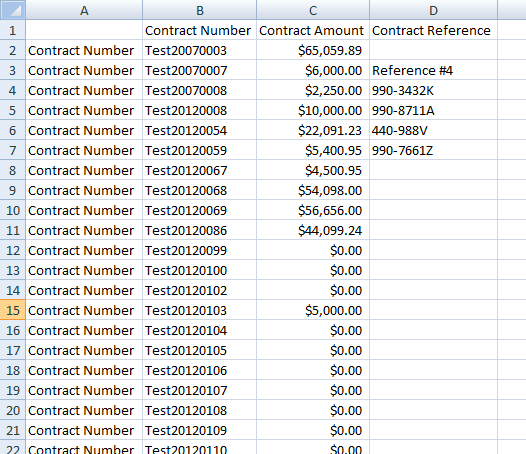


Found out that what's causing exported CSV's first column to become row values was the obsolete NavigateToReportAction.Parameters for sorting

I commented that part and voila, that solved the problem.


Header Image doesn't Display on Telerik Report through Silverlight Report Viewer

Problem: The header image doesn't display on Telerik Report when viewed through Silverlight Report Viewer. But when exported, the image is being displayed.

Solution: 
From Telerik Reporting KB Article

PROBLEM
Images, Charts, Barcodes and Shapes are not being displayed in the Silverlight report viewer.

DESCRIPTION
When a report is previewed in the Silverlight report viewer, Images, Charts, Barcodes and Shapes are missing, however they are present when exporting to one of the supported formats.

SOLUTION
The most probable reason is missing resource endpoint for the Telerik Reporting WCF Servicethat is responsible for serving all images: Picturebox, Chart, Shapes and Barcodes. For proper configuration please refer to the Hosting WCF Service in IIS help article. 
The Silverlight report viewer lives entirely on the client side, while the report rendering is performed on the server. The XAML rendering extension (used by Silverlight report viewer)streams images as resources (similar to HTML), so if the resource endpoint is missing in the service configuration, the images would not be served. When exporting, images are embeddedin the export file.


For SSL: See How to: Enable SSL for Telerik Reporting WCF service


Related Forum Thread: Embedded Image Resources not rendering in Silverlight ReportViewer

Next:
* Take a look at the Custom Binding and its use on Silverlight Application and Telerik Reporting WCF Service

Thursday, June 6, 2013

No column header when exporting to CSV from Telerik Report

Check the config file. Make sure that the NoHeader attribute is set to "false"
<Telerik.Reporting>
<Extensions>
<Render>
<Extension name="CSV">
<Parameters>
<Parameter name="NoHeader" value="false"/>
<Parameter name="NoStaticText" value="true"/>
</Parameters>
</Extension>
</Render>
</Extensions>
</Telerik.Reporting>


What if you see the textboxes names and you don't want it of course?

namespace ClassLibrary3
{
    using System.ComponentModel;
    using System.Drawing;
    using System.Windows.Forms;
    using Telerik.Reporting;
    using Telerik.Reporting.Drawing;

    /// <summary>
    /// Summary description for Report1.
    /// </summary>
    public partial class Report1 : Telerik.Reporting.Report
    {
        public Report1()
        {
            /// <summary>
            /// Required for telerik Reporting designer support
            /// </summary>
            InitializeComponent();

            //
            // TODO: Add any constructor code after InitializeComponent call
            //

            this.textBox1.Name = "Text Box 1";
            this.textBox2.Name = "Text Box 2";
            this.textBox3.Name = "Text-Box-3";

        }
    }
}


Set the textboxes names according to your desired column header names.

Saturday, June 1, 2013

Telerik Report export to CSV has extra columns and headers of control names

Solution:
Configure the CSV rendering extension

Implementation:
By default the CSV rendering extension generates plain text files, without any formatting, and the first row contains the headers for all columns (you may choose whether to have this header row or not).

In Telerik Reporting, device information settings are used to pass rendering parameters to a rendering extension. You can specify device information settings in a variety of ways. You can use the <Telerik.Reporting> configuration section to specify rendering parameters globally. Programmatically, you can use the ReportProcessor.RenderReport() method. For more information about specifying rendering parameters globally, see Configuring Telerik Reporting.

The example below shows a sample application configuration file (App.config or Web.config depending on whether it is a Windows Forms or ASP.NET application) in which we modify the original CSV rendering extension settings to generate a CSV file without the header row (NoHeader = True) and all TextBox items that contain static text (not an expression) skipped (NoStaticText = True):
 
<?xml version="1.0"?> 
<configuration> 
  <!-- The configSectins element should be the first child element of configuration --> 
  <configSections> 
   <!-- Substitute Version=X.X.X.X with the assembly version you are using! --> 
   <section 
      name="Telerik.Reporting" 
      type="Telerik.Reporting.Processing.Config.ReportingConfigurationSection, Telerik.Reporting, Version=X.X.X.X, Culture=neutral, PublicKeyToken=a9d7983dfcc261be" 
      allowLocation="true" 
      allowDefinition="Everywhere"/> 
  </configSections> 
       
  <Telerik.Reporting> 
    <Extensions> 
      <Render> 
        <Extension name="CSV"
          <Parameters> 
            <Parameter name="NoHeader" value="true"/> 
            <Parameter name="NoStaticText" value="true"/> 
          </Parameters> 
        </Extension> 
      </Render> 
    </Extensions> 
  </Telerik.Reporting> 
</configuration> 

If the report exported with default settings looked like this:

addressIDCaptionTextBox1,cityCaptionTextBox1,postalCodeCaptionTextBox1,textBox1,cityDataTextBox,postalCodeDataTextBox  
AddressID,City,PostalCode,20,Bothell,98011  
AddressID,City,PostalCode,21,Bothell,98011  
AddressID,City,PostalCode,22,Portland,97205  
AddressID,City,PostalCode,23,Seattle,98104  
AddressID,City,PostalCode,24,Duluth,55802  
AddressID,City,PostalCode,25,Dallas,75201  
AddressID,City,PostalCode,26,San Francisco,94109  
AddressID,City,PostalCode,27,Nevada,84407  
AddressID,City,PostalCode,28,Phoenix,85004  
AddressID,City,PostalCode,29,Memphis,38103  
AddressID,City,PostalCode,30,Orlando,32804  
AddressID,City,PostalCode,31,Ottawa,K4B 1T7  
AddressID,City,PostalCode,32,Montreal,H1Y 2H5 

With the given device information you will get:

20,Bothell,98011  
21,Bothell,98011  
22,Portland,97205  
23,Seattle,98104  
24,Duluth,55802  
25,Dallas,75201  
26,San Francisco,94109  
27,Nevada,84407  
28,Phoenix,85004  
29,Memphis,38103  
30,Orlando,32804  
31,Ottawa,K4B 1T7  
32,Montreal,H1Y 2H5  

Source: Configuring the CSV Rendering Extension